

Released by Jens Kafitz, 2022 - www.MariExtensionPack.org | Join us on  ,
, or
or 

RELEASED ON: August 17, 2022
LAST PATCH ON: May 3rd, 2023 - 5R9.v8
BACKWARDS COMPATIBLE TO: Extension Pack 5 + 5 R2 - 5 R8 
MINIMUM REQUIREMENT (for Mari 4.x): MARI 4.1v2
MINIMUM REQUIREMENT (for Mari 5.x): MARI 5.0v3
RECOMMENDED (for Mari 4.x): Mari 4.7v7 or Mari 4.8v3 or higher
RECOMMENDED (for Mari 5.x): Mari 5.0v3 or higher
|
|
Mari 6.x is not supported due to changes in Python Versions |

ICONLEGEND
 New Feature
  Feature Update
  Feature available in Nodegraph only
 Mari 4.7 or higher
  Mari 4.8 or higher
  Mari 5.0 or higher
|
EXTENSION PACK 5 R9 |
 Welcome to Mari Extension Pack 5 R9, the 10th free update of the 5-Series and biggest R-Releases ever in the 5-Series.
Extension Pack 5 R9 is a major rewrite, updating the Plugin to Python 3.7.7 and QT 5.12.
This version is compatible with both Mari 4.x and Mari 5.x via separate installers
Dozens of new features aimed at improving the User Experience and nearly 60 bugfixes round of this big release - and despite its massive size,
it remains a free upgrade to existing Mari Extension Pack 5 Customers !
For a full overview of the features released in Extension Pack 5 see each dedicated release notes.
•Extension Pack 5 R8 Release Notes
•Extension Pack 5 R7 Release Notes
•Extension Pack 5 R6.v2 Release Notes
•Extension Pack 5 R6 Release Notes
•Extension Pack 5 R5 Release Notes
•Extension Pack 5 R4 Release Notes
•Extension Pack 5 R3 Release Notes
•Extension Pack 5 R2 Release Notes
•Extension Pack 5 R1 Release Notes
|
NEW FEATURES |
Click on a feature for more information
 Extension Pack 5 R9 has been rewritten to support Python 3.7.7 and QT 5.12, making it compatible with Mari 5.x versions.
Extension Pack 5 R9 now ships in a Mari 4.x and a Mari 5.x version
By removing legacy compatibility checks for the Mari 5.x Version of Extension Pack 5 R9, multiple tools and nodes will now run faster
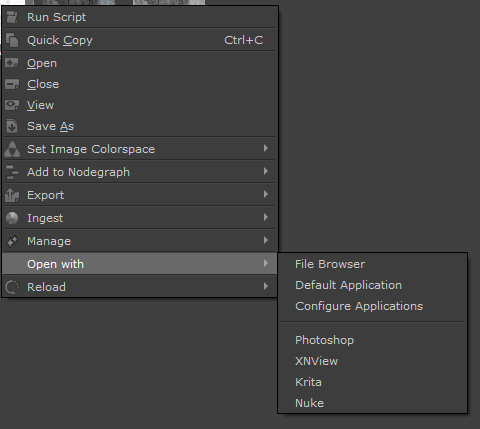
A new sub-menu 'Open with' has been added to the Image Manager Right Mouse Click Menu.
It allows you to open an image in
▪Your File Browser
▪The OS default application associated to the File Format
▪Up to 10 freely configurable applications
By default, if found on your System, Photoshop and Krita will be added to the Application list.
Example of using Open in App in combination with Reload to quickly edit Tileable Textures in Photoshop
Auto Reloading changed images from Disc now runs up to 2x faster
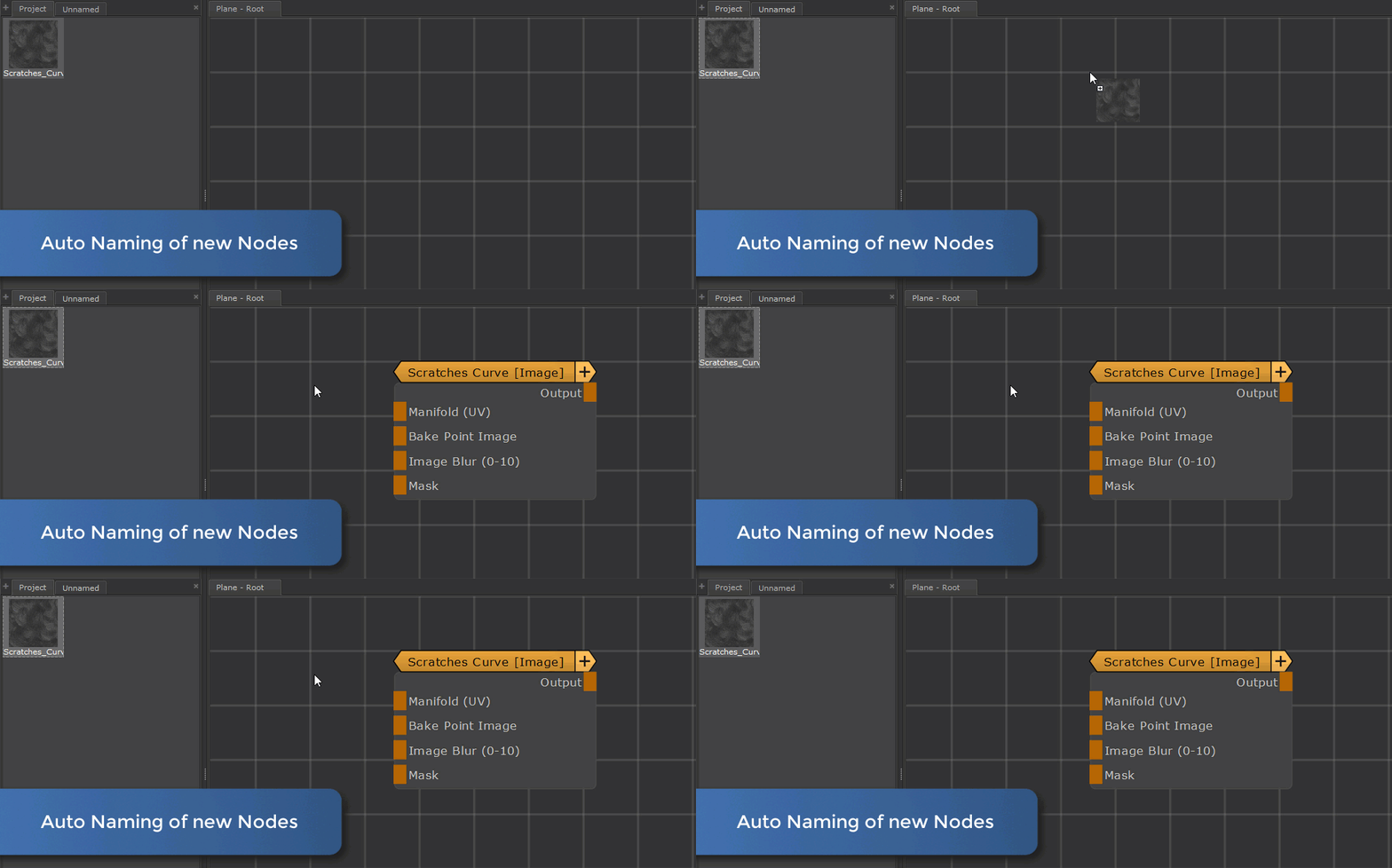
Drag & Dropping an image from Image Manager to the Nodegraph and selecting a Node Type will now auto rename the new node with the format
▪IMAGE_NAME [NODETYPE]
Example of an automatically named node on creation
Drag & Dropping an image containing a UDIM Number in its name/path to Layerstack or Nodegraph, then selecting the 'Image' Node Type, will now
create an image node that is pre-configured to place the image only in the one UDIM.
Example of Automatic placement of an 'Image' Node in UDIMs, when the dragged Image contained a UDIM Number
Extension Pack's Drag & Drop Handling can now be adjusted, activated and deactivated with more granularity via the Preferences / Misc Tab

In Mari 4.8 or higher, creating more than one Node via a drag and drop action now auto aligns the nodes and sets the port list mode to collapsed
In Mari 4.8 or higher, dragging more than 3 images into the Nodegraph or Layerstack, now also allows you to directly create and ingest into Extension pack Material Templates or any material you yourself added to the Shelf.
A total of 6 new procedural nodes have been added
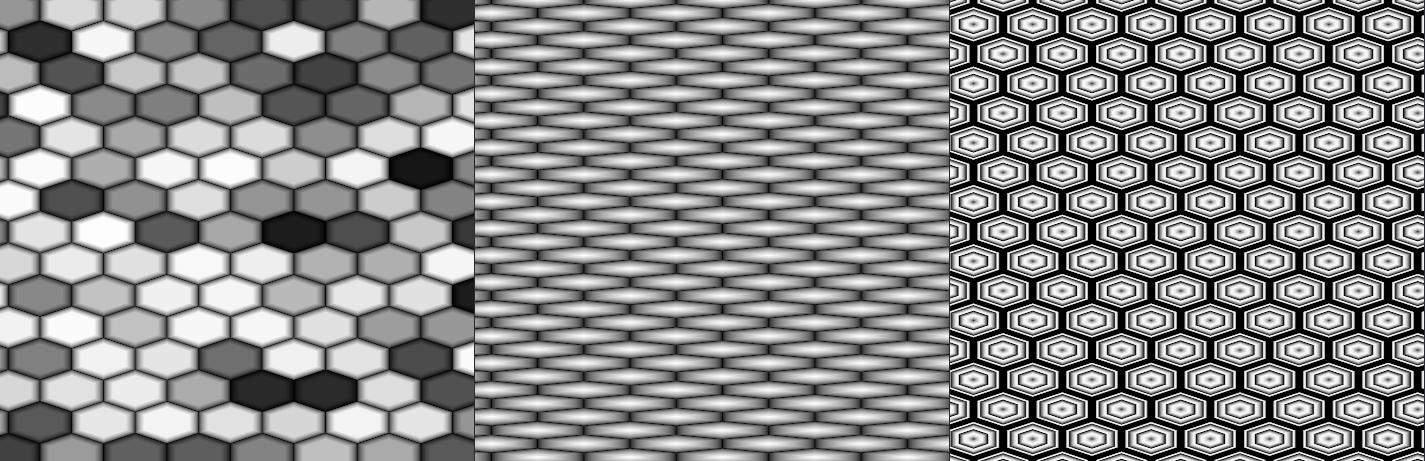
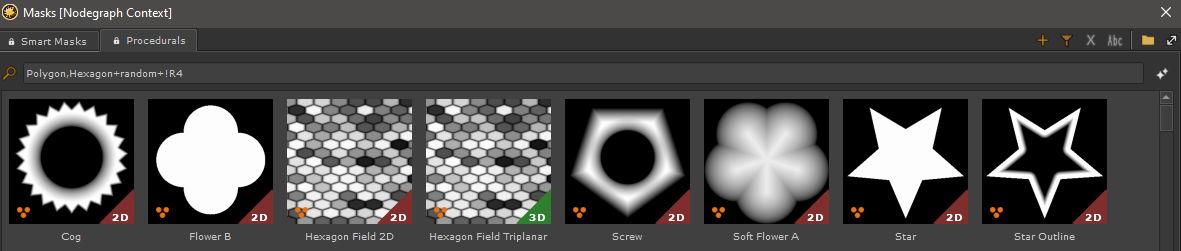
Hexagon 2D & Hexagon Triplanar allows you to create hexagonal textures
Some Examples produced with the Hexagon Node
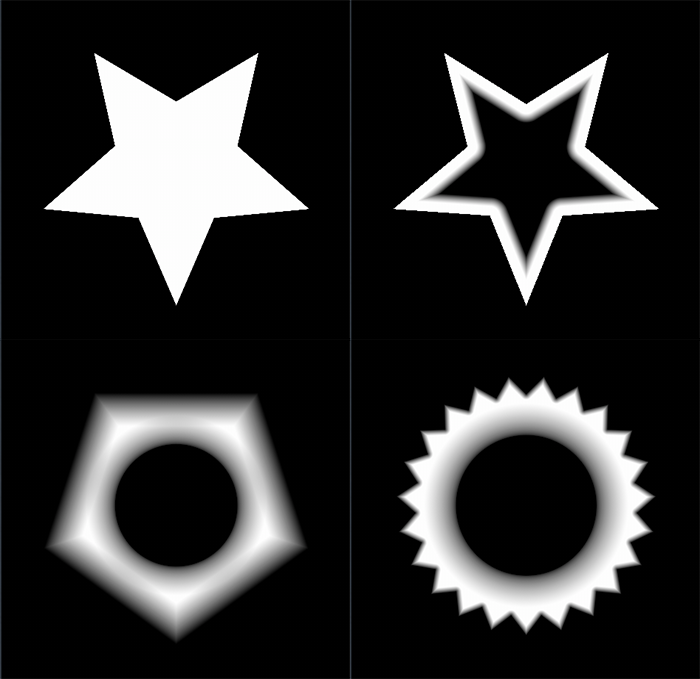
Polygon Soft 2D & Polygon Soft Triplanar creates simple soft shaped polygons .. or one if that's what you want
Some Examples produced with the Polygon Soft Node

Polygon 2D & Polygon Triplanar. Multifunctional Polygon Node with many look options
Some Examples produced with the Polygon Node
Example Looks for Polygon and Hexagon Nodes have been added to the Procedural Tab of the Preset Browser.

A new Node Tiled Infinity was added in Mari 4.6v2 or higher.
Infinity Tiling will apply a texture to the UVs based on a Hex Grid, with each Cell having a different sample point of the
original texture, hiding any repeating pattern when tiled.
The node will work best with input textures that have a chaotic appearance and does not work well with geometric shapes.
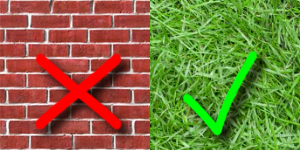
Comparison of the same Texture applied via a standard Tiled Node vs the new Tiled Infinity Node
Infinity Tiling Mode can also be ticked on, on Axis Projection Nodes, Image Nodes and Tiled (Extended) Nodes
Triplanar (3D) and UV based Material Templates can now be switched to Infinity Tiling
Example of toggling a material template to use infinity tiling
Selecting more than 3 nodes and pressing the 'M' Hotkey to execute a Smart Merge Command will now layer the nodes together using MultiMixer Nodes
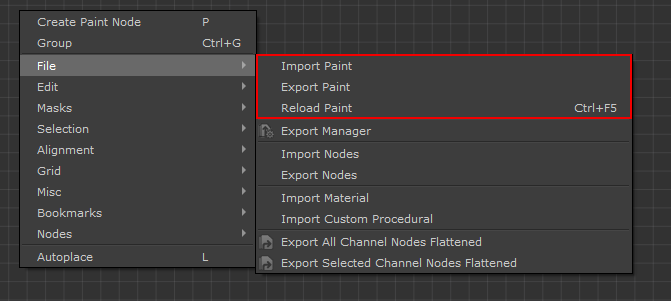
A new 'Reload Paint' Option has been added. Reload Paint is capable of
▪Reloading Paint Node Image Data from their Path on Disc
▪Reloading Image Manager Files for Nodes with Images
▪Reloading Bake Point Data fed into a Node via a 'Bake Point Image' Port
▪Reloading Geo Channels of selected Geo Channel Nodes
Paint Node 'Import' and 'Export' Options have been renamed to 'Import Paint' and 'Export Paint'
A number of small Improvements have been made to the Set Project Paths Tool:
The currently set path for each Variable is now more clearly visible in a separate 'Currently Set' field
Quick Tips have been added to the bottom of the UI

Python Scripts associated to Hotbox Buttons in Mari 5.x, now require a
import mari
line in their python code, if calling the Mari Python API from within the script, since the parenting of the processes has changed.
Mari 4.x behavior of Python invoking Hotbox Buttons remains unchanged.
Export Custom Channel Selection, Export Geometry, Export UV Masks and Export Images now allow you to open the export location in your file browser after export
Clicking on the "Open' Button after an export will open the export location in a file browser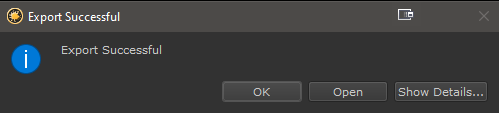
The Substance Baker Bridge now supports using Adobe Substance Designer instead of Substance Automation Toolkit for Baking (requires Substance Designer 12.1 or later)
You can now use either "Substance Automation Toolkit" or "Adobe Substance 3D Designer" (12.1 or higher)
with the Mari/Substance Baker Bridge !
The Substance Baker Bridge now supports the 'Transferred Texture From Mesh' Baker.
|
|
The 'Transferred Texture from Mesh' Baker currently does not support UDIM Sequences as a Baking Source due to limitations on the Substance Side |

Extension Pack enables the user to easily change the Environment Image by dragging an EXR or HDR file to the Canvas.
To facilitate this workflow. a series of HDRIs are now automatically added to the Mari Shelf in a folder 'Enviornments' in Mari 4.7 or higher.
Extension Pack will now auto create HDRI Shelves for you.
Mari's own HDRIs from its installation Folder are automatically loaded into a sorted shelf on startup (can be disabled via Environment Variables)
HDRIs from other applications, if found on your computer, are automatically loaded into a sorted shelf on startup (can be disabled via Environment Variables)
Any Folder specified in the Paths / Environments Section of the Mari preference will be automatically loaded into shelves under the 'Environments' Group

Projection Modes (Front / Through) and Projection Target (All / Selected) are now exposed as UI Buttons.
Which Projection Modes to show and which Toolbar to add them to, is configurable in the Mari Preferences / Painting Tab
Toggling between 'Project: Front' and 'Project: Through' is now mapped to [CTRL+F] by default, unless that hotkey is already in use or the action has
already a user shortcut

Mari Extension Pack allowed previously to link the Paint Buffers Bit Depth to the current channel selection.
This has now been extended to work with your active Paint Target, meaning it will work even with Paint Nodes in the Nodegraph.
As was the case previously the option can be found on the Toolbar Properties of the Transform Paint tool but has been renamed to 'Link Depth to Paint Target'
'Focus Channel Content' if run on a channel containing Materials (shared by multiple channels), will now filter the node selection to only include
nodes that contribute to the selected channel
A new option 'Focus Channel Content (stop after Radios)' has been added to the Right Mouse Click / Nodegraph Menu in the Channels Palette.
It will only select and frame channel contents in the Nodegraph, up to and including radio nodes, but not include input connections of radio nodes.
Saving and reapplying of UDIM Layout Resolution Templates is now available in all Patch Resize Menus (e.g. Patches / Resize Patches, Channel / Resize etc.).
It now supports both channels and nodes (paint nodes, bake points etc.) for storing and reapplying custom UDIM Resolution Layouts
While Mari by default requires you to double-click a node to open its Attributes, you can now change this to a single click
via a new setting in the Nodegraph Tab of the Mari Preferences.
|
|
Single Click Node Properties are off by default and you need to activate it yourself in the preferences |

In Mari 4.7 or higher, Radio Transmitter Nodes now auto inherit the Name of the Node they are connected to, unless the transmitter has been manually renamed
Whenever a Radio Transmitter Input is updated, the connected Radio Node Names are now updated to prevent Radio Node Names from going out of date
A number of improvements have been made to the Swap Node / Swap Layer Tool in Mari 5.x
Swap Node or Swap Layer with any Material selected, now shows all Materials from the Shelf, as options to swap to.
Swap Node or Swap Layer with a standard Nodetype selected, now shows Custom Procedurals from your shelf as well, as options to swap to.
|
|
Swap Node Type / Layer Type has many special behaviors, depending on the selected node type. |
Patch Bake to Image Manager now supports both Layerstack and Nodegraph Patch Extraction. If your current selection is inconclusive, you will
be prompted to specify what to Bake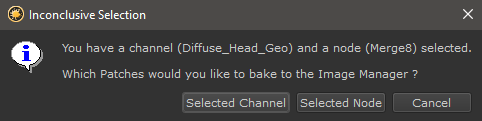
Patch Bake to Image Manager now automatically places the extracted Images into a 'Patch Bake' Tab in the Image Manager
If you ever worked with an ACES Colorspace Configuration file, you know how long the list of available configurations is.
All Extension Pack Tools allowing color space selection now use a filtered dropdown box, giving you quicker access to the desired colorspace
No more browsing through long lists of colorspaces

Extension Pack already allows you to change the Light Rotation via Hotkeys without having to go to the Lights Palette.
With Extension Pack 5 R9 a new default Hotbox is added to the F4 Hotkey , allowing you to
oRotate Lights
oChange Light Intensity
oToggle the Background and change its Blurring
oToggle Shadows
Material IDs from Selection Group now supports leaving the Channel Name empty. If this is the case, the resulting Geo Channels will be baked
1:1 with the Selection Group Names. It also now defaults again to create Standard Mari Channels instead of Geo Channels.
Export Custom Channel Selection now provides more details in the Export Summary
Convert to Paintable can now be run on a Material Layer
A new Sync Channel Selection Option has been added to the Channels Palette, which will sync your current channel selection across all objects.
Screenshot all Channels now has its own settings dialog and syncs the channel selection across all objects in your scene.
You can now mark multiple image manager images as reference images so they are excluded from the Remove Unused Images Tool
Smart Rename when run on Bake Points with Filters, now applies the Filter Name to the Bake Point
Channel Component Selection has been added to the gl_cross Node
Added a mask port to the Grade+ Node, to mask out the grading effect without the need for extra nodes
The 'Use as Environment Light / Use as Paint Through Image' pop up when dragging an EXR into the Viewport, will now only appear if the
current tool is not the Paint Through Tool.
A Fabric geometry has been added to the Default Objects
In Mari 5, Extension Pack now saves and restores the current Root Nodegraph Position and Zoomlevel per Project
In Mari 5, Extension Pack now manages the Nodegraph Tabs on a per Object Level. Open Nodegraph Tabs that do not belong to the current Object
are closed and previously open Tabs belonging to the active object are reopened
A progress bar has been added to Export UV Mask
Windows TDR Checks on Mari Startup can now be permanently disabled via the Environment Variable MARI_EP_PREVENT_TDR_CHECK
Python Tools are now available in the Main WIndow / Python Menu.
The following Node types have been added to the list of nodes, accepted by the Mari Material Ingest Tool, when ingesting into a Material Template.
This in in addition to all other Node types already supported by Mari itself as well as Extension Pack.
|
|
The Material Ingest Tool can dynamically fill nodes with images, if the node name corresponds to the Material Stream Name. |
▪Sphere Map
▪Sphere Map Projector
▪Flow
▪Camera Projection
|
BUGFIXES |
Click on a feature for more information
Channels created using the Channels from Node Tool, would crash Mari when exported using the standard Mari Export Manager.
(they would export fine using Extension Pack's Exporter)
A number of smaller fixes have been made to the Substance Baker Bridge:
Reset Buttons on Sliders in some Baker Settings were cut off by the dialog borders and not easily clickable
Setting the 'Ignore Backface' Setting in the 'Ambient Occlusion from Mesh' Baker to 'From High Def Mesh Settings, while simultaneously having
'Self Occlusion' on 'Always', would generate a thicker occlusion than expected.
To avoid this, the 'Self Occlusion' Setting will now be forced to 'From High Def Mesh' as well, if the 'Self Occlusion' Setting is set to 'From High Def Mesh Setting'
Having the 'World Space Normal' Baker as part of a preset (manually created or automatically maintained presets e.g. 'Last Used Settings'), would cause an
error when loading the preset
The Node Multi Rename Tool's Search and Replace Function and Remove Suffix Function no longer worked
Smart Rename Nodes no longer ignored Dot Nodes in Mari 4.7 and higher
Quick Unproject Tools would give a deprecation warning in the python console, due to colorspace handling changes in some Mari Versions
Quick Unproject from View would incorrectly set the resulting Image colorspace to 'Mari Working Color Space'
Default Object 'Cylinder' was missing an icon on Linux
Some dialogs with Preset fields, were not displaying the 'Rename' Icon on Linux
The Preset Browser was missing the 'Reset Filter' Icon on Linux
Duplicate Channel would not rebuild all 'Shared Layers' if a Material Layer was present in the duplicated channel
The Gabor Noise, when created in a Layerstack, was incorrectly creating a connection from the Layer beneath to the 'Manifold' Port of the Node
Several Triplanar Versions of Nodes did not allow independent axis scaling via the 'Scale (XYZ)' Node Port, since the X-Value (Red Channel)
was applied to all 3 axis instead. The change has an effect on all existing node versions.
Channels created by Material ID from Selection Groups were not tagged as Scalar by default
It was possible to select 'Geo Channels' as targets, in Mari Versions were Geo Channels not yet existed as a feature
The resulting Image from a Patch Bake to Image Manager Operation did not always have the same color space settings as the source channel
it was baked from
Jump to Node Input printed an error in the Python Console when there was no node connected to any input port
Height Blend did not auto connect to selected Materials when the materials displacement output port was not called 'Disp'
Height Blend did not auto connect to the Mask of a Multi Channel Merge Node, if one of the selected materials to blend, had the 'Current Material' Viewer attached to it
Certain combinations of Rotation and Mirroring in the Tiled (Extended) Node, could break Normal Map Reorientation
Cloning directly from an image no longer worked since Extension Pack was always forcing the Paint Through Tool active when an image was
dragged to the Canvas. The Paint Through Tool will now no longer auto activate, when the current tool is the 'Clone Stamp' Tool.
Using Swap Nodes to swap between Material Templates no longer transferred all attributes
Using Swap Nodes to swap between Material Templates did not always correctly convert between Roughness and Glossiness.
The resulting Node Name of a Swap Nodes/Layer Operation could be overly long when swapping some standard Mari Nodes
Swapping from an 'Unreal' Material Template to another Shader Model left the 'Unreal' Tag in the Node Name.
Inserting a new node between a Radio Transmitter and a connected Radio Node did not update the Radio Node's Label to reflect that the Radio
Connection had changed
Values returned by gl_length, gl_distance and gl_dot product math node were incorrect on some output ports.
The change only has an effect on newly created versions of the Node.
If Material Templates were located in a non-writable location, Mari would print out several error messages on Mari Startup
Remove Unused Images would not remove an unused image, if another copy of the identical image was in the image manager and in use in a node.
Export Selection did not open the File Browser in the Default Location set for Images/References
Auto Reloading changed Images from Disc would sometimes load in multiple copies of the image
Duplicate & Flatten would crash if applied to a channel with only one layer
Duplicate & Flatten would not run if a Material Layer was present in the channel
Export Custom Channel Selection would fail on export with certain Nodegraph Configurations
Export Custom Channel Selection sometimes printed empty lines to the python console
Cancelling Export Custom Channel Selection during Export would not close the Progress Bar anymore
Export Custom Channel Selection when using 'Export Modified Only' could export more than required if multiChannel Nodes were present in the exported channel
Adding a preset in Export Custom Channel Selection no longer worked in Mari 4.8
Cancelling Export Custom Channel Selection during Export could lead to Mari hanging for a long time
Extension Pack was forcing the Nodegraph Grid Width and Height Preferences to 0, if Mari was launched with factory-settings, causing
a Crash when toggling the Grid on
Extension Pack was forcing the 'Show Grid' option to off on each Mari Restart.
Creating a new Channel Preset in Channels from Node Tool no longer worked in Mari 4.8
There were overlapping UI elements when using an OCIO Colorspace File with very long Colorspace names (e.g. ACES)
Fixed a crash when caching a Node via the Nodegraph
Some Default Hotboxes were installed with read-only permissions on Linux
In Mari 4.8, some sliders and check boxes of the default Hotbox 'Brush Settings' no longer had an effect
With certain Hotbox Settings, typing in a Hotbox Slider Value field would print out errors in the Python Console
In Mari 4.8, Images imported into a shelf via the 'Import Items' Right Mouse Click Menu, did not work with Extension Pack's Drag and Drop Actions
(e.g. Drag to Nodegraph, drag to Canvas etc.)
In Mari 4.8, dragging more than one Image from the Image Manager to the Nodegraph or Layerstack did not create multiple Node Instances.
Nodes with a 'Bake Point Image' Input Port no longer auto inherited images from connected bake points in Mari 4.8
Loading or resetting View Layouts would remove custom Extension Pack UI Buttons like the Substance Baker Bridge.
Fix requires Mari 4.8v3 or higher.
|
PATCHES |
Click on a patch for more information
Loading of custom Environment Map Paths on Mari Startup could fail and hang if Thumbnail or Cache Data was contained in the Folder
In Mari 5, the Light Hotbox kept resetting itself to the default F4 Hotkey on Mari restart, even when changed by the User
Licensing the Mari 4 Version of Extension Pack 5 R9 via Environment Variable no longer worked and could cause Extension Pack 5R9 to not load
Some files on Linux had incorrect permissions when written
In some cases Material Template installation on Mari Startup could get stuck in a loop
Reload Paint can now reload Geo Channels
On Windows Machines, pointing the Environment Variable MARI_EP_LICENSE_FILE_PATH directly to a (unmounted) network location no longer worked
and required network drive mounting as workarounds.
Drag and Drop of Images from Shelf to Layerstack no longer worked in Mari 4.7 Versions
Dragging a manually imported Shelf Image into Layerstack or Nodegraph would print a python error.
Copy/Pasting Node Attributes would clear the clipboard after pasting, allowing only one paste action to be performed
Copy/Pasting Node Attributes would paste Image Attributes in a way, that new image instances would be loaded into the image manager
Some Image Types from the shelf could cause an 'Image not Found' error when applied to a Node via Drag & Drop
Adding more than 7 Applications to the 'Open with ...' Image Manager dialog did not work and would cause Mari to error on start
In some cases using 'Align Nodes' would stop the Undo History Recording
Indie and Freelance Licenses were incorrectly identified as Studio Licenses in the Licensing Dialog.
In Mari 5, the Hotbox 'Aiming' no longer pre-selected a button unless the aiming line was crossing a button or the cursor was over the button.
mari.ExtensionPack.node.getNodeCategory() would error on certain nodes
For Mari 4.8 and higher, a warning has been added when trying to use a Bake Point Image Port while your current geo does not have a UDIM 1001
Additional Log Info and Solutions were added, when the user encountered a SSL Certificate error during licensing
Saved custom Brushes were deleted from the shelf on each Mari restart
The Environment Variables MARI_EP_PREVENT_MARI_HDRI_LOADING and MARI_EP_PREVENT_3RDPARTY_HDRI_LOADING were no longer respected
Node Align Right could give a python error in some cases
Some Extension Pack Dialogs (e.g. Connect to Radio Transmitter) had their contents cut off when setting a larger custom font size via the Mari Preferences
Patch Bake to Image Manager could fail if the node to bake had characters in its name that the operation system cannot write into a filename
Due to a Mari Bug, some tools were showing already deleted channels (e.g. Channel Exporter). Interacting with those deleted channels could cause Mari to crash.
A workaround for the bug has been implemented to prevent these Channels from appearing in Extension Pack tools.
In Mari 5, Node Align Right sometimes aligned nodes to the 'average center' of the node selection instead of the far right.
In Mari 5, the 'Garbage Collection' command in the Extension Pack / Project Menu gave a python error
 The Text Tool registered to the Mari Tools Toolbar caused a segmentation fault crash on Mari Exit. Until a fix is supplied by the Foundry, the Text
Tool has been relocated to the Extension Pack Toolbar. You can also use on the other Tools Toolbar Layouts shipping with Extension Pack ,which still include the Text Tool.
Export Custom Channel Selection could error and hang when no "Raw" or "Utility - Raw" Colorspace was found in your OCIO file.
Extension Pack will now try to resolve this issue on its own, and if unable give you a warning message
Export Custom Channel Selection could error and hang when processing Bake Points containing invalid, non-existent UDIM NUmbers in their Bake Range
[MARI 4.8+] Export Custom Channel Selection would export the wrong channel information, if the the channel to export was connected to a multiChannel Output Node,
and an export mode other than "Full Resolution" and "Default Bit Depth" was chosen
[MARI 4.7] Dragging an Image from the Image Manager to a Layerstack no longer created a new Layer, even after selecting a layer type from the popup dialog
Dragging items from the Mask Shelf into the Nodegraph would sometimes place the preset at the inverted nodegraph position (e.g. Y Coordinate of 1000 would become -1000)
when multiple users were using Mari on one machine, file ownership clashes could prevent Extension Pack from loading
Deleting a single Mari Default HDRI Image from the Shelf would install that previously deleted HDR over and over on each Mari restart, creating duplicates
The "Setting up Extension Pack" Progress Bar got launched with "Installation of Mari HDRIs" even if all Mari HDRIs were already installed (the progress bar went straight to 100% percent completion though). Extension Pack will now check first if showing the progress bar is necessary for default Mari HDRIs
mari.ExtensionPack.bakePoints.smartBakeHierarchy() Python method produced an error
[MARI 5+, LINUX] The SSL_CERT_FILE Environment Variable is now automatically set for the environment, Mari is run in, if the OS SSL Certificate is located at
/etc/pki/ca-trust/extracted/pem/tls-ca-bundle.pem.
This is to avoid licensing issues that have come up in the past, because of Mari's built in, outdated SSL Certificate shipping with its Linux Version.
If you already have set a SSL_CERT_FILE Environment Variable no action is taken.
Right Mouse clicking into the Image Manager would cause a Mari Crash
Extension Pack 5R9.v9 is a limited patch release only available to Users of Mari Extension Pack 6.
The Licensing System has been switched over to accept Mari Extension Pack 6 Licensing Data
Changes to a Hotkey assignment on an action added by third party (e.g. any Extension Pack Action) were "forgotten" after a Mari restart
The Mari Viewport could show a Shader Compile Error on certain AMD Video Card Drivers
The Substance Baker Bridge did not import files correctly if the Importer Mode in the Mari Preferences was set to "Background Importer"
The "Levels" Dropbox was disabled if "Inherit from Source Object" was ticked on in the Subdivision Dialog
|
STUDIO DEPLOYMENT UPDATES |
If you have previously downloaded the Help Files for offline usage you should replace it with the new one using the method described here