Released by Jens Kafitz, 2021 - www.MariExtensionPack.org   | Join us on  & or


Download Online Help


RELEASE: January 5th, 2021


BACKWARDS COMPATIBLE TO: Extension Pack 5 + 5 R2 | R3 | R4


MINIMUM REQUIREMENT (for Mari 4.x):  MARI 4.1v2


RECOMMENDED:  MARI 4.7v1 or higher


MARI NON-COMMERCIAL is not supported due to restrictions by the Foundry


Introduction

New Features

Feature Changes

Feature Deprecations

Bugfixes


Studio Deployment Updates


ICONLEGEND


New Feature       Feature Update       Feature available in Nodegraph only       Feature requires Mari 4.7 or higher  


EXTENSION PACK 5 R5

The focus of 5 R5 is making use of additional functionality added in Mari 4.7 as well as fixing a large number of reported bugs


 For a full overview of the features released in Extension Pack 5 see each dedicated release notes.


Extension Pack 5 R4 Release Notes

Extension Pack 5 R3 Release Notes

Extension Pack 5 R2 Release Notes

Extension Pack 5 R1 Release Notes


NEW FEATURES

Click on a feature for more information


You can now easily align Nodes or Backdrops with each other (Left, Right, Top, Bottom) using the Right Mouse Click Menu or the Hotkeys

CTRL + ALT + Left/Right/Up/Down


Dragging an Image from the Image Manager into the Layerstack or Nodegraph will now let you choose which node to use the image in.

To make it a quick process for common nodes, the most used ones are mapped to quick access Hotkeys (1-6)


To make it easier to set up a Height Blend system between Nodegraph nodes or materials, a new 'Smart Height Blend' Option has been added.

 Smart Height Blend will ...


owith two nodes selected, auto connect the nodes to the FG/BG Ports of the Height Blend and connect the result to a Mask slot of

a already connected node (e.g. Merge, Mix etc.)


owith two materials selected,  auto connect the materials 'Displacement' Ports to the FG/BG Ports of the Height Blend and connect the result

 to a Mask slot of a already connected node  (e.g. Multi-Channel Merge, Mix etc.)


oIf no node is selected or only one node is selected, the standard Mari behavior is maintained.


The Smart Height Blend Option is mapped to the default Nodegraph Shortcut CTRL+ALT+H and is also available from the Create Nodes Marking Menu


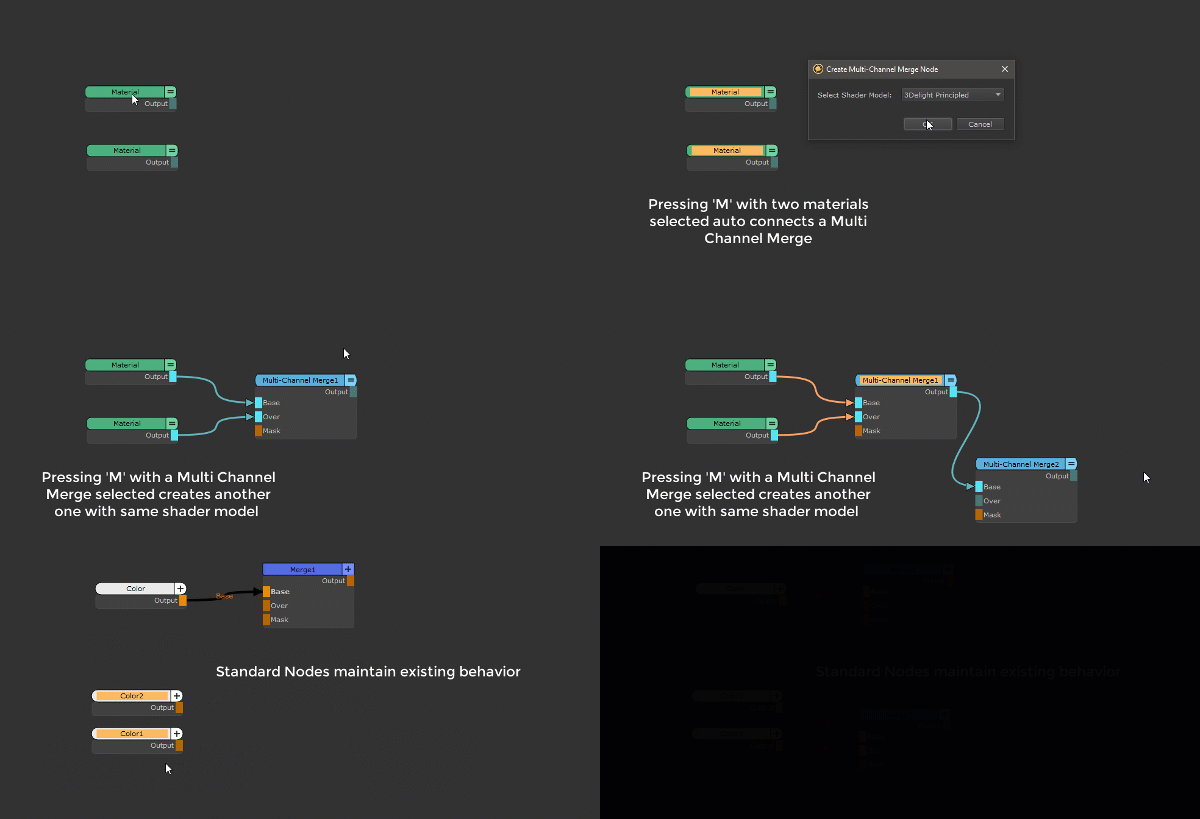
In a recent version the 'Smart Merge Node' Functionality was introduced. Depending on selection type pressing for example 'M' in the Nodegraph

creates either a standard Merge Node or a Multi-Channel Merge Node (for material blending).

In this version the Smart Merge got ... smarter.


oMultiChannel Merge Nodes will now be properly hooked up to the selected material nodes. Same as you are used to with 

standard Merge Nodes


oSelecting 2 Nodes (Materials or other nodes) and creating a Merge Node now auto-connects the two material nodes to the Base and

Over Port(s) of the Merge or MultiChannel Merge Node.


The 'Smart Merge' Functionality is mapped to Hotkey 'M' in the Nodegraph and now also available via the  Create Nodes Marking Menu


Mari 4.7 introduces this functionality as standard. Depending on what Mari Version you load the Merge Node will use more Extension Pack additions (pre 4.7) or less (4.7+)


Additional Grunge Textures have been added to the Grunge Library in the Shelf


For Users developing their own Python Scripts, new Helper Dialogs have been added to the Python Tools:


oMari Node Paths

oMIME Type Inspector


FEATURE CHANGES - TOOLS

Click on a feature for more information


The Post Process Dialog now warns you if you are using Variables that are reserved for 'per file' post processes, in 'per channel' mode


The Post Process Dialog now checks if an executable path on an active command line exists before closing the dialog


The Post Process Dialog now shows examples of commands, if you have not set your own commands previously. Standard examples are


Arnold TXMake

Vray img2tiledExr

OpenExr exrmaketiled


'Export only modified Textures' now is aware of the different node streams within a MultiChannel Node 

(e.g. Materials, Multi Channel Bake Points, Group Nodes with multiple Outputs).


While previously for example a material would trigger an export of all associated channels when even a single stream changed, the Exporter will

now correctly identify what part of the material has changed and only mark the relevant node stream for export.


The Colorspace dropdown in the Add Packed Channel Dialog has been reworked to have better separation between pre-defined

colorspace roles and colorspaces


With the introduction of the new shelf in Mari 4.7, some Extension Pack Tools have been changed to make use of the new shelf features.

These changes only apply when using Mari 4.7 or above. Shelf functionality for previous Mari Versions remains unchanged.


Extension Pack Items added to the standard Mari Shelf are now grouped under 'Extension Pack'


Extension Pack Material Templates added to the standard Mari Shelf, are now receiving searchable Tags


Create Shelf from Folder Icon now appears in the new Mari 4.7 Shelf as well, available directly after Mari startup (as opposed to within a project only)


Create Shelf from Folder now supports loading of custom procedurals


Create Shelf from Folder now supports Grouping of loaded Shelves


Create Shelf from Folder now lets the user choose to resolve shelf name conflicts when importing instead of importing items into existing shelves always


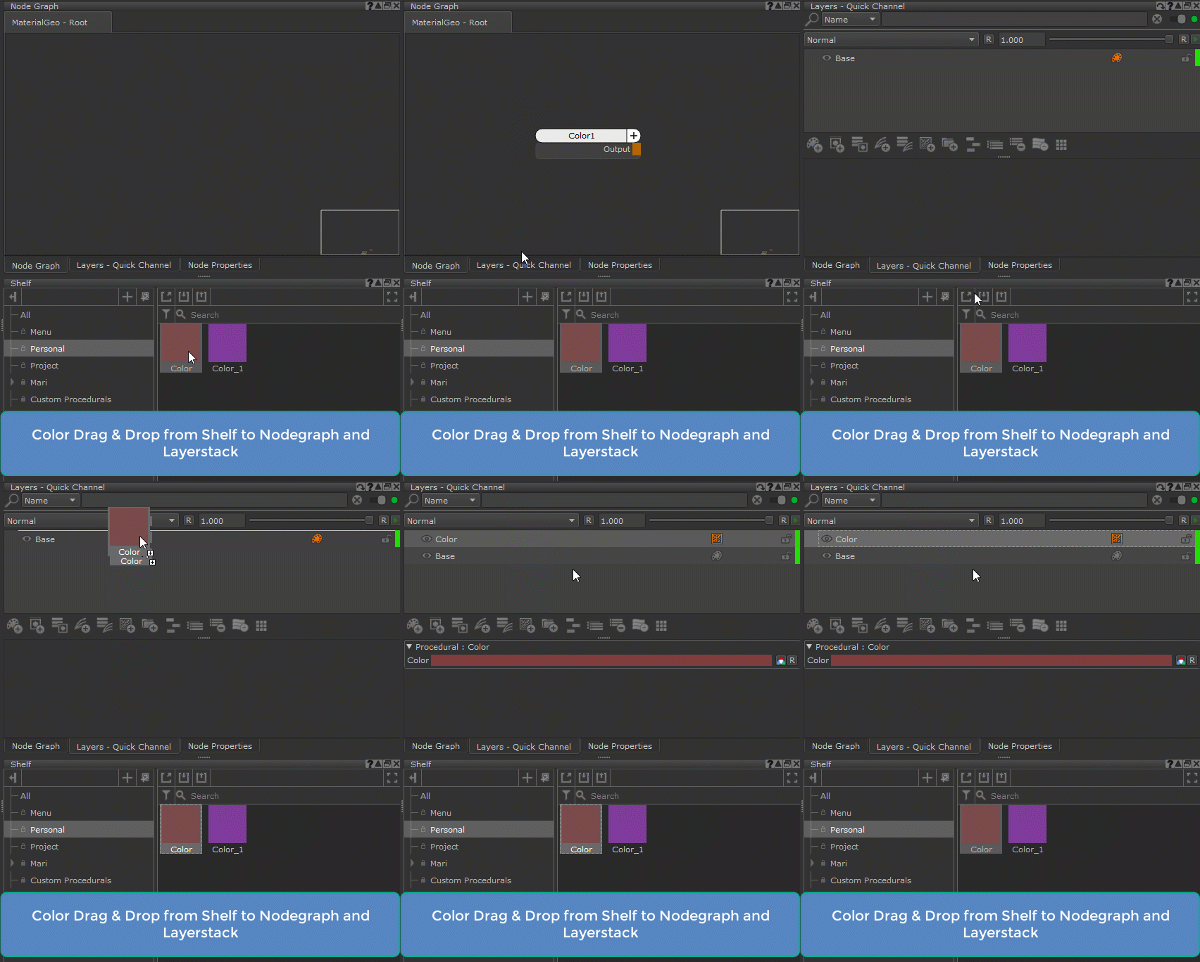
Dragging a Color from the Shelf to the Layerstack will now automatically create a Color Node/Layer for you. Mari 4.7 already allows for dragging a color from Shelf to the Nodegraph


When using Mari 4.7 or higher, the Extension Pack Preset Browser now supports drag & drop into both Nodegraph and Layerstack

(previously only Nodegraph drag and drop was supported)


When using one of the Extension Pack custom Tools Toolbars , the new 'Current Material' Shader Mode introduced in Mari 4.7 is now included.

The Toolbar gets dynamically upgraded/downgraded when switching from e.g. Mari 4.6 to Mari 4.7 or vice versa.


Changing the Paint Buffer Bitdepth via the Toolbar now automatically clamps or unclamps the Paintbuffer based on selected bitDepth


The Rename Nodes Dialog now does not block the user from interacting with the main Mari Window


Text Fields are now reset to empty once Apply is clicked


The new Node Selection Options introduced in Mari 4.7 have been added to the existing Extension Pack options in the

Nodegraph/Selection Menu (in case you forget all the hotkeys)


Jump to Node Input (Nodegraph Hotkey '[' ) will now list the name of connected nodes next to the input port they are connected to


Added a warning dialog to Ingest from Image Manager, when attempting to delete the auto-generated 'My Favourites' Preset


Isolate Select now works in Selection Mode: Object  as well 


Several Extension Pack Nodegraph Tools will execute up to 40% faster due to a refactoring for Mari 4.7+. 

Most notable speed improvements are in 


oSwap Node Type

oDuplicate with Connections

oimporting Presets from Preset Browser via Drag & Drop

oparts of the Smart Mask Setup Process


Added more informative Error Messages to Licensing Dialog when Licensing failed due to an invalid Operating System SSL Certificate.


Added more informative Error Messages to Licensing Dialog when Licensing failed due to a Write Permission Error


Added a Internet Connectivity Check to the Licensing Dialog


A new Environment Variable  MARI_EP_CONNECTION_TIMEOUT has been exposed. This Environment Variable can be used to set the number of seconds

Extension Pack should wait for a license server response and can be useful to reduce Mari Startup Time or handle slow Internet Connections


The Action Finder Dialog now allows you to trigger actions for testing


FEATURE DEPRECATIONS

Due to overlapping features with core functionality introduced in Mari 4.7, the following Extension Pack Features have been removed when

using Mari 4.7 or higher:


Click on a feature for more information


The Merge Node Set Colorspace Enabled Preference has been removed for Mari 4.7 or higher, since newer Mari Versions now handle

Merge Nodes 'Set Colorspace Enabled' Node Property correctly by default in the Nodegraph


When using Mari 4.7+, all Extension Pack Bake Point Functionality has been removed, since Mari 4.7 and higher provides sufficient

      Bake Point Management by default.


Create Channel from custom Resolution Template has been removed (it only existed in the Extension Pack Menu and was under-developed)


BUGFIXES

Click on a feature for more information


If installation of default Hotboxes failed for whatever reason (e.g. permissions), Mari Extension Pack would not continue loading


Extension Pack tried & failed with an Error to look for the Renderman for Mari Shader if launched on Mari Versions below 4.5v1


Running a manual 'Smart Mask Setup' Process via the Nodegraph / Masks Submenu would create the necessary bakes in your project

but not hook them up to a selected Smart Mask. 


As originally intended, the Option will now setup any selected Smart Mask Nodes and if none is selected, run a generic setup to prepare

your scene for future Smart Mask Use.


Running a 'Smart Mask Setup' Process via the Nodegraph/ Masks Submenu would no longer create a Radio Transmitter on the Ambient 

Occlusion


Drag'n'Drop of Smart Masks from the Preset Browser into the Nodegraph no longer automatically opened the 'Smart Mask Setup' Dialog


Some Smart Masks contained references to old Extension Pack Versions


While working with Mari on Remote Desktops, some Extension Pack Nodegraph Tools did not work when working inside a Material or Graph Group


A change introduced in 5 R4 in the way layer selections were detected caused errors if a layerstack had a channel layer. 

A number of Extension Pack Tools operating on the Layerstack were affected.

('Ingest Images into current Layer', 'Convert to Paintable', 'Clone & Merge' etc.)


Toggle Unselected Visibility & Toggle Unselected Lock no longer worked in Mari 4.5v1 and higher


Toggle Un+Selected Visibility & Toggle Un+Selected Lock no longer worked in Mari Versions below Mari 4.5v1


Creating a Pinned Channel from the Channel Palette no longer worked


Fixed a bug when saving Project Templates, where the saved Light Orientation 'Fixed to Camera/Scene' was not loaded when importing a template


Project Templates did not save mari preference items containing color information into the Template 


Images with a certain Alpha encoding would load as transparent inside the Nodes Axis Projection, Image, Tiled Extended and

Cylindrical Projections when using the following OCIO Files 


oACES

oSPI-anim

oSPI-vfx


This change will trigger a 'Convert Layers' dialog on project open, if the project uses one of these nodes. Press 'Convert' to inherit the Bugfix.


Material ID from Selection Groups would abort with an error when trying to overwrite existing Material ID Channels with the same name


The line width of the Horizontal/Vertical Line Separator Buttons in custom Hotboxes was set too small, making them no longer visible.


Clicking on a button in the Hotbox manager preview area would cause the preview to disappear


Due to a bug in Mari, transform changes to Decals via the Viewport Locator would only be applied permanently if a navigation change 

was made in the viewport before completing the decal transformation.  Extension Pack 5 R5 now ensures the transformation stays permanent regardless.


Manual Image Reload via Image Manager / Reload / Reload Image no longer worked


Auto-Image Reloading of updated Images send Mari into an endless loading loop


When using Swap Node Type / Swap Layer Type to swap between Material Templates with different Specular Workflows

(Roughness vs Glossiness), the Specular Values would only be converted if an Image was mapped to the Roughness/Glossiness

Attribute of the Material Template. After this fix, constant slider settings are now also converted between Roughness <-> Glossiness.


Swap Node Type / Swap Layer Type allowed the user to select Backdrop nodes as a target.


Swap Node Type / Swap Layer Type did not copy the Color/Scalar  setting of Color Attributes


This fix requires Mari 4.6v4 or higher to work


The 'Patches/Resize Selected/Double Size' Action did not work due to a typo in the internal naming


There was a typo in the 'Patches/Resize Selected/Double Size' UI Name


Patch to Image Manager had stopped working in a recent 5 R.x Release


Users were able to delete default Export Presets in Export Custom Channel Selection Dialog


The  Color/Scalar setting of Color Attributes was not taken into account when using 'Only Modified UDIM' Export Setting.


This fix requires Mari 4.6v4 or higher to work


Users were able to delete default Presets in the Add Packed Channel Dialog


When Extension Pack Resources were moved out of the Installation directory using the Resource Relocation system,

the History of Recent Files in the New Project window was getting longer and longer with each Mari restart


When Extension Pack Resources were moved out of the Installation directory using the Resource Relocation system,isolate

the History of Recent Material Templates in the Mari Material Ingester was getting longer and longer with each Mari restart


STUDIO DEPLOYMENT UPDATES

If you have previously downloaded the Help Files for offline usage you should replace it with the new one using the method described here


A warning dialog has been added on Mari Start, if the Extension Pack Resources currently loaded do not belong to the current Extension Pack Version.

This is to avoid studios forgetting to update moved Extension Pack resources (icons, shelf content etc.)


A new Environment Variable  MARI_EP_CONNECTION_TIMEOUT has been exposed. This Environment Variable can be used to set the number of seconds

Extension Pack should wait for a license server response and can be useful to reduce Mari Startup Time for air-gapped studios