Released by Jens Kafitz, 2021 - www.MariExtensionPack.org   | Join us on  & or


Download Online Help


RELEASE:   July 1st, 2021


BACKWARDS COMPATIBLE TO: Extension Pack 5 + 5 R2 | R3 | R4 | R5 | R6


MINIMUM MARI REQUIREMENT (for Mari 4.x):  MARI 4.1v2


MINIMUM REQUIREMENT (for Mari 5.x):  Unsupported due to Python Version differences


RECOMMENDED:  MARI 4.7v1 or higher


MARI NON-COMMERCIAL is not supported due to restrictions by the Foundry


Introduction

New Features

Feature Changes

Bugfixes


Studio Deployment Updates


ICONLEGEND


New Feature       Feature Update       Feature available in Nodegraph only       Feature requires Mari 4.7 or higher    


EXTENSION PACK 5R6.v2

Extension Pack 5 R6v2 is a maintenance update with Bugfixes and some minor new features.


 For a full overview of the features released in Extension Pack 5 see each dedicated release notes.


Extension Pack 5 R6 Release Notes

Extension Pack 5 R5 Release Notes

Extension Pack 5 R4 Release Notes

Extension Pack 5 R3 Release Notes

Extension Pack 5 R2 Release Notes

Extension Pack 5 R1 Release Notes


NEW FEATURES


The new Distribute Nodes Tool in the Nodegraph allows you to evenly distribute node selections with uniform distance between nodes.

Default Hotkey is CTRL+Alt+D in the Nodegraph Context unless that Hotkey is used already by the User.


You can now assign a hotkey to cycle through open Nodegraph Tabs

By default in Mari 4.7 or higher, the Hotkey CTRL+TAB is assigned to this in the Nodegraph Context, unless that Hotkey is used already by the User


You can now assign a hotkey to jump to the root Nodegraph Tab.

By default in Mari 4.7 or higher, the Hotkey HOME is assigned to this in the Nodegraph Context, unless that Hotkey is used already by the User


FEATURE CHANGES - TOOLS


Some 'from Mesh' Bakers of the Substance Baker Bridge now support the use of Normal Maps for additional Surface Details


You can now duplicate a selected Baker


The 'Max Rear' and 'Max Frontal Value' Sliders now support out of range values. The sliders will rescale to the new range


Loading a Preset containing External High Def Mesh Files, now checks if the High Def Mesh File on Disc still exists and removes any that don't.


The log now provides additional warnings if an existing mesh export was reused during baking.


Choosing 'From External File'  in the High Def Mesh Section, now opens the Filebrowser in the last used HD Mesh Location


'From External File'  in the High Def Mesh Section, now supports FBX Files


Target Object Matching & per-HighresMesh Ignore Backfaces Options are not available when loading FBX files


You can now set a preset as the default Preset to load when the Bridge is opened. E.g setting the 'last used' Preset as default, 

will always start the bridge with the last used settings. Choose the blank row in the Dropdown as a default Preset, to remove

the currently set default Preset and revert to standard behavior on start.


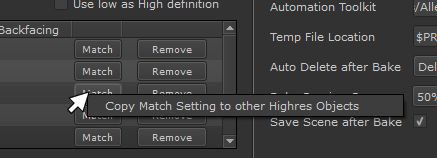
Right Mouse Clicking on a 'Match' Button in the High Def Mesh List, now allows you to copy the Match Settings from this row to all others


BUGFIXES

Click on a feature for more information


Export Custom Channel Selection was hanging on export in Mari Versions below Mari 4.7


The automatic Presets ''Last Exported Channels" and "Last Exported Channels (all Objects)" were not updated if the Output path 

contained a $ Variable (e.g. $ENTITY,$CHANNEL etc.)


Substance Baker Bridge would fail to Bake on some Linux Distributions


Having more than 2 individually matched Highres Objects, would cause the Bridge to hang on Mesh Export


Loading  a Preset, incorrectly set the 'Max Rear Value' to the same number as 'Max Frontal Value'


The Max Rear and Max Frontal Values could be set to 0.0, which would produce empty results in baking


The 'Last used' Presets would not automatically remove Highdef Mesh Entries, linking to files on disc that no longer existed, causing Bakes to hang indefinitely.


Highres Mesh Matching using External Files was not working if the External File had been exported with Materials on


Bakes were not imported in the order they were in the Baker List. Bakes are now imported from bottom to top, as they appear in the Baker Render List


The Progress Bar would sometimes get stuck at 50% during the final Temporary Data Cleanup (no steps were missed though)


The Titles of the UI were overlapping other UI Elements when using a Mari Version below 4.5


STUDIO DEPLOYMENT UPDATES


If you have previously downloaded the Help Files for offline usage you should replace it with the new one using the method described here