Released by Jens Kafitz, 2020 - www.MariExtensionPack.org   | Join us on  & or


Download Online Help


RELEASE: August 7th, 2020


BACKWARDS COMPATIBLITY: Extension Pack 5 | 5 R2 | 5 R3


MINIMUM REQUIREMENT:  MARI 4.1v2


RECOMMENDED:  MARI 4.6v1 or higher


MARI NON-COMMERCIAL is not supported due to restrictions by the Foundry


Introduction

New Features

Feature Changes (Tools)

Feature Changes  (Nodes)

Bugfixes


Studio Deployment Updates


ICONLEGEND


= New Feature

= Feature Update

= Feature available in Nodegraph only  


EXTENSION PACK 5 R4

Extension Pack 5 R4 for Mari 4.x is the third of multiple free updates for customers of the Extension Pack 5 series. 

For a full overview of the features released in Extension Pack 5 see its dedicated release notes.


Extension Pack 5 R3 Release Notes

Extension Pack 5 R2 Release Notes

Extension Pack 5 R1 Release Notes


NEW FEATURES

Click on a feature for more information


You can now 'ingest' selected images from the image manager into a selected node or layer

The Images will be inserted if the Node/Layer has Image Attributes, so it works great for Materials.


To make it a one click solution the tool will continually learn more about your preferred assignments so even if your naming convention might not match one of

the predefined standard names it will learn what you like !


Directly ingest image manager selections into your selected node or layer


New Decal Material Templates have been added to the Material Template Shelf and Mari Material Ingester, allowing you to quickly add details to your textures

via non-destructive projections. Also works great with the Image Manager Material Ingester !


Getting your projections setup with locators is now a one click workflow. If a node or layer is selected that supports locator assignment, simply switching to the 

'Transform Object Tool' will handle all the locator setup for you, so you can get right to positioning things where you want them. 

If you click back on the object, the temporary locator will be removed from the scene so there's no clutter !


All of the new tools working together: 

New Decal Material Templates, ingesting from the image manager and easy one click projection transforms via the standard mari transform tool right in the viewport


Apart from new Decal Material Templates, you now also can scatter Decal Materials all over your object using the new Scatter Material Templates


Scattering a Megascans Decal to create a new, unique and non-repeating material


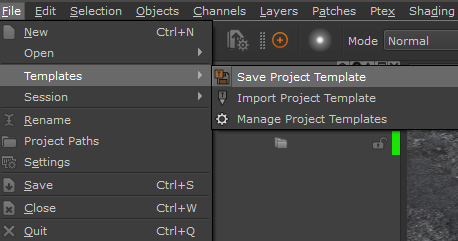
A brand new way to get started with your projects has been added to the file menu: Project Templates.


Project Templates allow you to save a project and import it into another one to get your preferred setup up and running quickly.

Of course you don't need to always manually import it - you can have it done for you automatically on Project creation.


Project Templates support all Mari has to offer 


oNodegraphs (Nodes, Shaders, Channels etc.) with or without Paint Information

oProjectors/Cameras

oLight Rigs

oViewport Configuration (current camera position, viewer, viewport settings etc.)

oeven Preferences are supported


To make it fit more neatly into pipelines, Templates can also be added and imported via Environment Variables.


Many nodes that have Image Properties can now directly inherit their image from a Bake Point via a Node Port.

This allows you to have complex nodegraphs as a source inside those nodes.


Nodes that support such behavior are:


Axis Projection

Cylindrical Projection

Texture Scatters

Image

Tiled (Extended)

.. and all Pattern Engine Nodes


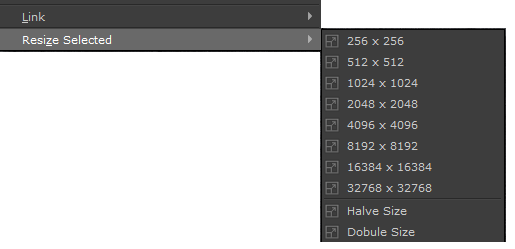
You might have never realized but the 'Resize Patch' Menu Option under Patches has no effect on Paint Nodes in Nodegraph Workflows.

Not anymore ! Extension Pack 5R4 replaces these options with its own and 'Resize Patch' now correctly works in Both Layerstack and Nodegraph ..

and to top it off it now also works on Bake Points (after they have been baked once) !


As requested you can now define a custom icon as the hotbox center


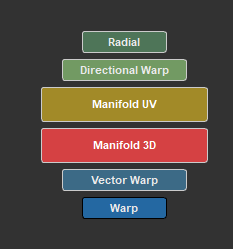
There's also a new default Hotbox on the Nodegraph Hotkey 'U' (Mari 4.6v4+) to create Manifold Nodes:


There's some new presets in the Procedural Tab of the Preset Browser based on Nodes introduced in recent Mari releases.

You will need Mari 4.6 or higher to use those though.


Mari 4.6v4 introduces some new preferences to configure the UI splits. Extension Pack 5R4 adds quick and easy presets for those to the View menu

You will need Mari 4.6 or higher to use those though.


Extension Pack Default Objects that are otherwise available via the Object Palette are now easily accessible in the File List of the 'New Project' Window


Some of you have a lot of projects in Mari and it might not always be easy apparent from the screenshot what is in them. 

To help you out, the Project Tool tip now lists all Objects in your Project as a 'Object List'


Extension Pack 5 R4 now allows you to hide Material Templates from the Shelf and Material Ingester via Preferences. So you only see those Material Templates

you really need. This can also be set via Environment Variables for those of you working in a Studio Pipeline !


FEATURE CHANGES - TOOLS

Click on a feature for more information


The Hotbox Manager now supports assignment of Nodegraph Only Hotkeys to Marking Menus (requires Mari 4.6v4 or higher)


The Nodegraph Tools Hotbox now includes options to control Bake Points


All Presets in the Procedural Tab of the Preset Browser have been upgraded to use the latest node versions


Preset Browser Grunge Presets available in the procedural tab have been standardized with consistent controls in-between presets


In the Preset Browser you can now exclude items via the Search bar by prefixing with an exclamation mark ('!')

 For example:


'Axis' will give you the two items Axis Mask and Axis Projection as a search result

'Axis+!Projection'  will give you only Axis Mask as a search result, since the Term 'Projection' is marked to be excluded.


Improvements to Error Handling of Preset Browser, when a Preset is changed, moved or deleted and the target location is in use by another user/has access restrictions.

 The preset will now first be tested for complete read/write permissions before doing anything to it.


Mari 4.6v4 introduces the ability to set Hotkeys directly to a 'Nodegraph' Context via Scripts.  As a result Extension Pack will now pre-assign a series of 

hotkeys for common Nodegraph commands. Of course if you already have one of those hotkeys in use, Extension Pack will respect that and not overwrite it.


The following hotkeys are now pre-assigned to work when the cursor is in the Nodegraph (Mari 4.6v4 or higher):


Node Creation Hotbox: C

Nodegraph Tools Hotbox: V

Manifold Creation Hotbox: U

Merge Node | MultiChannel Merge Node (depending): M

Radio Node: R

Radio Transmitter Node: T

Connect to Transmitter Node: Shift + R

Toggle Radio Node(s): Ctrl + Shift + R

Jump to Node Input: [

Jump to Node Output: ]

Smart Rename Node(s): Shift + N

Mulit Rename Node(s): Ctrl + N

Duplicate with Connections: Shift + D

Duplicate: Ctrl + Shift + D

Bookmark List: F2

Create Channels from Node:  F4

Histogram Scan Node: H

Histogram Range Node: Shift + H

Histogram Select Node:  Ctrl + H

Swap Node Type: X

Copy Node Attributes: Ctrl + Shift + C

Paste Node Attributes: Ctrl + Shift + V

Select Upstream Nodes: Shift + <

Bake to Paint Node: Alt + B

Preset Browser (toggle to show/hide): S


Licensing information can now be directly read into the Licensing dialog from an existing license file


MultiChannel Merge Nodes are now also affected by the Nodegraph Set Colorspace Enabled Preference.


The Channel Layer Dialog now supports Double Clicking a channel to add it


Improvements to viewport redraw behavior when changing the 'Locator Size' in the Transform Object Tools Toolbar.


A variation of the Jitter Color Node was added focused on Jittering Greyscale Values


Smart Rename nodes now recognizes Mari 4.6+ Geo Channel Nodes and will correctly rename connected nodes according to the geo channel that is in use on the node.


Reload Image Manager Image will now always update all instances of the image used in the project. The previous choice to select if to update only

current Object or all Objects has been removed to make the tool easier to use.


The Environment Variable to add Presets to the Channels from Node Tool has been renamed to MARI_EP_CHANNELS_FROM_NODE


For ease of access all available Extension Pack Environment variables are now listed on a single page here


FEATURE CHANGES - NODES

Click on a feature for more information

The Intensity Slider in the Bump and Displacement Group of Material Templates has been removed. Instead the 'Range' Slider can now extend past 1.0


Added an Offset slider to Bump and Displacement Groups of Material Templates


Added Metallic & Spec Color Remap Attributes to Material Templates

Several Performance Optimizations for the Material Templates


Histogram Range now can extend the Range past 1.0. Existing Nodes in old projects will not change.


Histogram Select now has a Clamping Option (on by default)


The Normal Format Converter now has an additional Output , giving the final converted Normal Format as a Value


The Normal Rotate Node can now accept the definition of its normal format as an incoming node stream via a node port e.g. from the Normal Format Converter


Pattern engine nodes now transmit rotational data via the Output UV Port, making them work nicely with Normal Maps when driving other nodes with the scatter nodes


Pattern engine nodes now have an additional FlipX | Flip Y Attribute in the Symmetry Control Group


Pattern engine nodes now have an additional Pattern Random Output Port which Outputs the node internal randomization values.


BUGFIXES

Click on a feature for more information

Fixed an issue that was preventing the Material Ingest Tool  to open on Mari 4.5 and 4.6v1.


3Delight Material Templates  were not included in the Material Ingest Tool Template Dropdown


Fixed an issue in Axis Projection, Tile Extended, Image and Cylindrical Projection Nodes where images with a certain alpha encoding would show as transparent


Pattern engine nodes nodes were outputting image cells flipped in Y


Cell Orientation inbetween different Triplanar Versions of Pattern engine nodes were not the same


Gradient from Image node contained a NAN in a default value, causing 'Convert Layer' messages on project open


3Delight & Unreal Material Templates didn't correctly list their Relatives (other Templates for that same Shader Type) in the Swap Node and Swap Layer Tools


Several Extension Pack Layer Tools (Convert to Paintable, Add Channel Layers etc.) were not correctly detecting the current layer selection if the layer selection

was inside a Multi Channel Group.


Copy Layer Attributes & Swap Layer Type were ignoring Rotation/Translation/Scale of Locator Settings inside of Nodes that use them 

(requires Mari 4.6 or higher)


Fixed a bug in the Custom Channel exporter where changes to Locators assigned to nodes did not mark a channel as dirty when using 'Export Modified UDIMs only' (Regression)


Saving a Preset did not save Paint Data into the preset


Fixed a bug in the Smart Mask Setup Tool, where recalculating blurred curvature channels in a project where they had been calculated previously, 

would flatten the originally supplied curvature channel


Smart Mask Noise Seed Slider Range has been reduced since very high values could affect the scale of the Noise.


Several of the procedural triplanar presets in the Preset Browser were broken, resulting in a red error screen when used.


Creating a Merge Node via the Smart Merge  Action was printing out a debug message into the python console on each use


Merge Node 'Set Color Space Enabled'  preference was disregarded when the Merge Node was created via the TAB Menu


Copy Node Attributes & Swap Node Type were ignoring Rotation/Translation/Scale of Locator Settings inside of Nodes that use them 

(requires Mari 4.6 or higher)


Backdrop colors  were not randomized on creation, if the backdrop was created via the TAB Menu


Some randomized Backdrop colors  were too dark by default


Quick Unproject Methods found in the Camera Menu (Unproject Layer, Channel, View) could error if the OCIO Colorspace Configuration file

used did not contain a 'raw' colorspace


Default Hotbox Installation could on rare occasions error and prevent Extension Pack from loading fully


Renaming a Hotbox that already had a hotkey assigned would not transfer the hotkey to the renamed hotbox and block the hotkey fro, being reassigned

until Mari was restarted.


The 'Create Shelf from Folder' Button was not added to the Mari Shelf when creating a new project from scratch.


The Timeout value for a failed License Server connection for Studios without Internet Connection was set too high, resulting in long Mari Program Start Times.


DEPLOYMENT UPDATES

Extension Pack can now be licensed for multiple users using an Environment variable. A license file can be generated from the Licensing Dialog.


The Contents of Resource Folder have been updated. 

If you have previously moved the resource folder to a location outside of the installation directory, you should replace it with the new one 

using the method described here


This Help File Document has been updated

If you have previously downloaded the Help Files for offline usage you should replace it with the new one using the method described here