
|
Image Array by Jens Kafitz |
 Where to find it:

 NodeGraph / Right Mouse Click / Add Nodes / Environment / Extension Pack /


The 'Array Image' Node (a modification of the Image Node) can be used to load a series of images into the Nodegraph while only treating
them as one Node.
This allows for transformations and repeats to be easily synced across multiple images.
It can be used together with the 'Manifold UV' Node in the Nodegraph to turn it into a full 'Tiled' Node again
In addition the Node overs 'Stencil' functionality that allows you to turn of default image wrapping around the edges
It's main purpose is to have tileable materials consisting of maps for each material channel without the need to create
and manage individual image or tiled nodes for each channel.
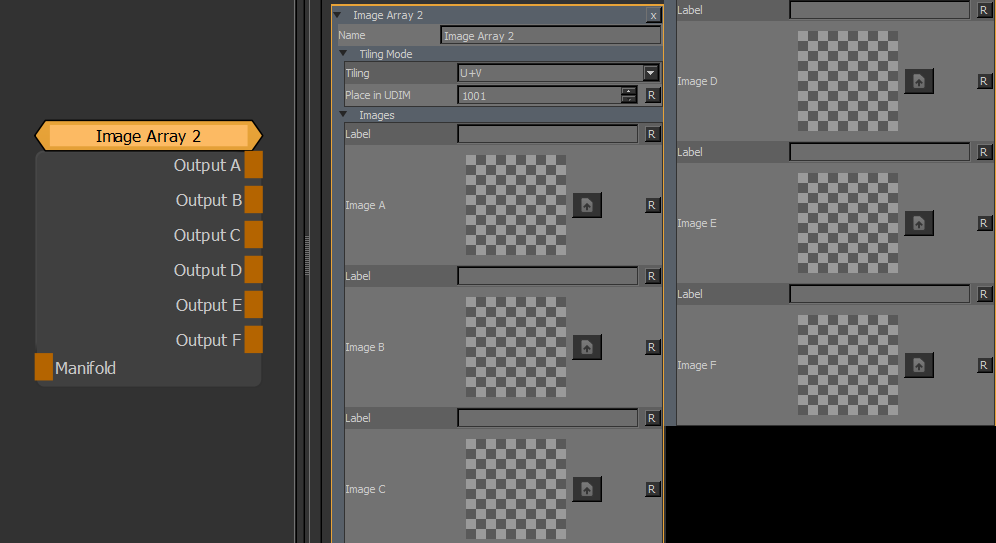
•Manifold
The 'Manifold' connection can be used to feed in a coordinate system to evaluate the Images on.
Possible Nodes to attach to are 'UV' & 'Manifold UV' for example to adjust the tiling of the images
•OUTPUT A-F
The Output from each Image slot
MAIN TAB
•Tiling
Determines the tiling mode:

•Place in UDIM
The UDIM to generate the images in when tiling mode is non-default
oIn Stencil Mode (No Tiling) this determines the UDIM to place the single image in
oin U/V (in UDIM) Tiling Mode, this determines the UDIM to place the repeating image in
oin U (in UDIM row) and in V (in UDIM Column) mode this determines the row or column to place the repeating images in.
•Label
A text field allowing you to enter a description of the image
•Image
Drag & Drop an image from the image manager or outside of Mari or use the Browse Button
to browse for one.