1.Locate the Installation Directory of Mari Extension Pack e.g
▪WINDOWS: MyDocuments / Mari / Scripts /
▪MAC: UserDirectory / Mari / Scripts /
▪Linux: UserDirectory / Mari / Scripts /
.. or a custom location you installed it to
2.Locate the Resources/Hotboxes Folder inside the Extension Pack Install Directory e.g.
▪WINDOWS: MyDocuments / Mari / Scripts / MariExtensionPack_6R1_forMari6 / Resources / Hotboxes
▪MAC: UserDirectory / Mari / Scripts / MariExtensionPack_6R1_forMari6 / Resources / Hotboxes
▪Linux: UserDirectory / Mari / Scripts / MariExtensionPack_6R1_forMari6 / Resources / Hotboxes
3.Copy (Ctrl+C) the entire contents of the "Hotboxes" Folder
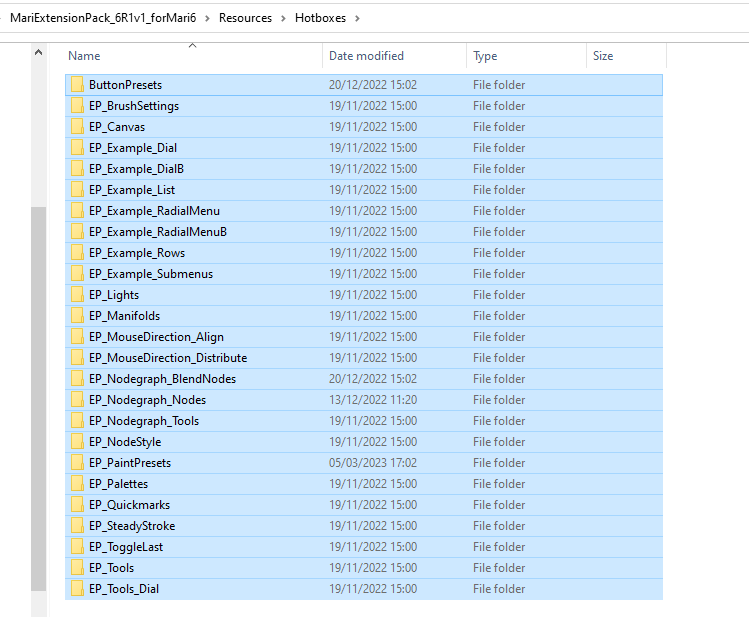
4.Locate the Mari User Settings directory.
If you are unsure, refer to the original "Access Denied" Error.
[WinError 5] Access is denied. : 'C:/Users/USRNAME/.mari/TheFoundry/Hotboxes/EP_SteadyStroke\Hotbox_Buttons.json'
If the error above you can see it would be located at C:/Users/USRNAME/.mari/TheFoundry
5.Check if you have a 'Hotboxes" Folder e.g. 'C:/Users/USRNAME/.mari/TheFoundry/Hotboxes.
If you do not have such a Folder, create one. Ensure correct naming "Hotboxes" (Plural, capital H)
6. Paste (Ctrl+V) the folders copied in step 3) into the folder and restart Mari.

