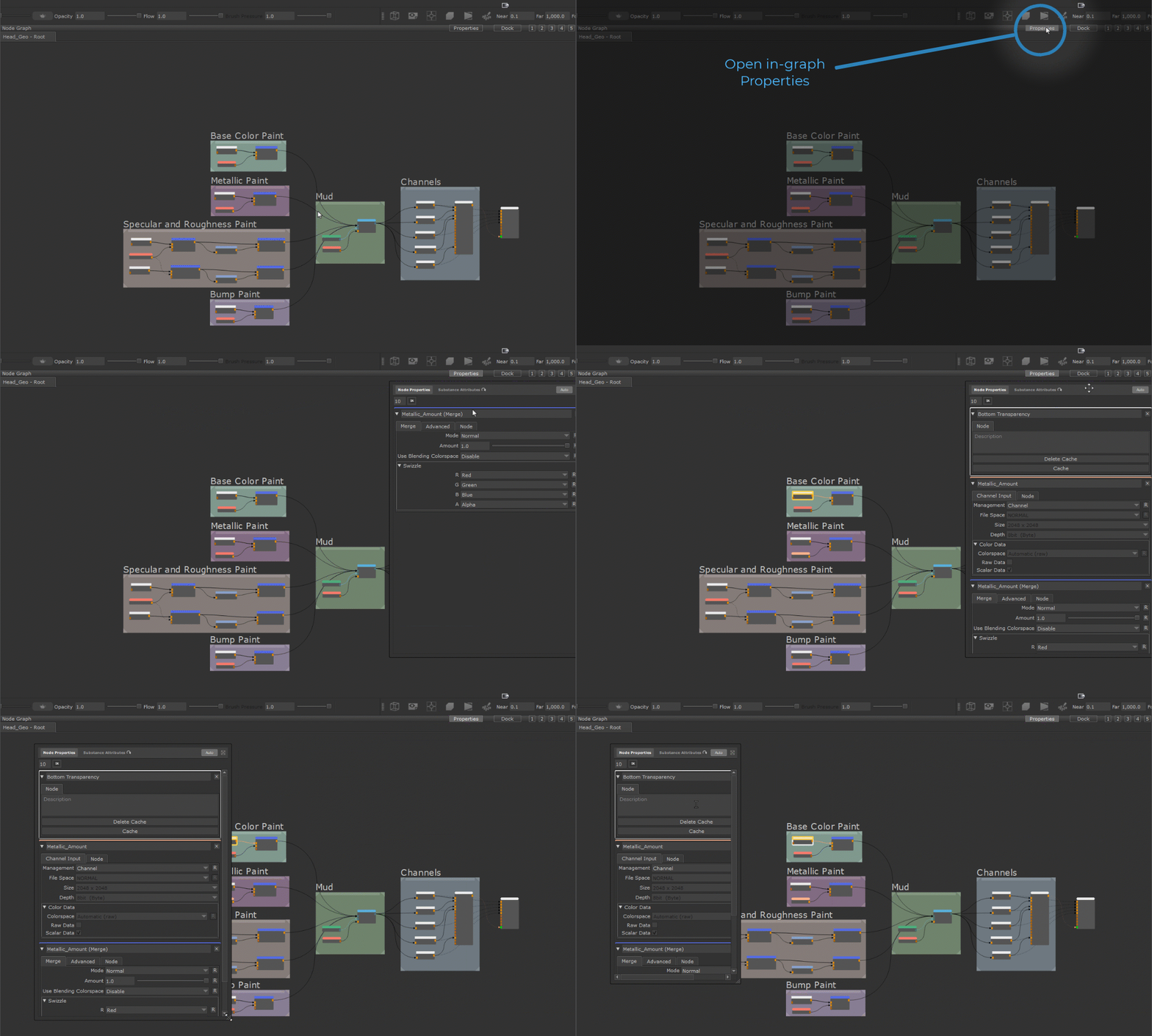
The Graph Properties allow you to open the Node Properties directly as a panel that is parented to the Nodegraph Palette, allowing you for example to work with a full screen graph (press SPACE to maximize the palette) without loosing access to your Node Properties.
Use the new "Properties" Button in the title bar of the Nodegraph Palette, to open the parented Node Properties Panel
•To open the Panel, click the new "Properties" Button in the Nodegraph Palette title bar
•You can move the panel within the Nodegraph and resize it to your liking, the size and position of the panel are stored.
•"Auto" Mode will automatically show the panel, when the Nodegraph is maximized (by pressing Space), even if the panel is hidden while the Nodegraph is docked.
The size and position of the Panel is remembered as separate saves for "Nodegraph Maximized" and "Nodegraph Docked (not maximized)" modes allowing you to set separate sizes and positions for the panel for the different layouts
Apart from editing native Mari Node Properties, the panel can also be used to edit Substance Attributes The Substance Tab acts like a "Reload from Selection", sampling the current Node selection and loading in associated Substance Files from it
 Where to find it:

 NodeGraph